
CentOS7へのMuninインストール手順です
Muninについて
Muninとは、MRTGやcacti等と同様にディスク、メモリ、CPU、ネットワーク等のリソースを監視してくれるシステムです。
構成としては、監視する対象のサーバに「munin-node」(エージェント)をインストールし、そのデータを収集するサーバに「munin-server」(データ収集サーバ)をインストールする形で構成されます。
※「munin-node」と「munin-server」は同居可能ですので、1台のサーバで自分を監視することももちろん可能です。
また、「Munin」の良いところは設定が非常に簡単だというところもあげられます。
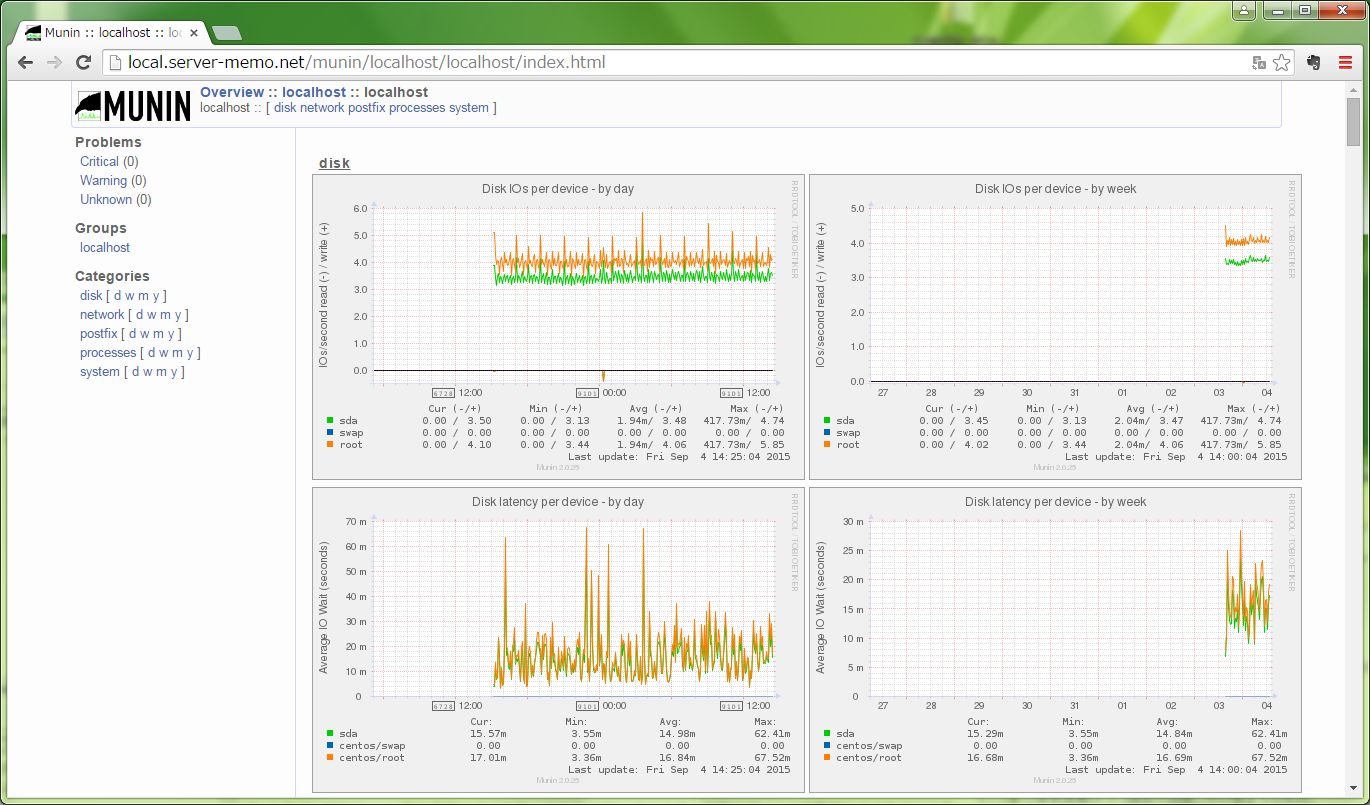
Munin画面
インストールのまえに
「Munin」のインストールを行う前に、今回の構成を簡単に説明します。
今回の構成
今回は、「監視サーバ」(192.168.1.100) に「munin-server」と「munin-node」をインストールして、自分自身を監視しながら、「監視対象サーバ」(192.168.1.150)も監視するという構成としています。
「監視対象サーバ」には「munin-node」だけインストールします。
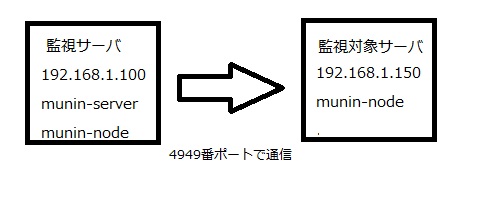
※「munin-server」から「munin-node」への通信は4949番ポートを使用するので、ファイアウォールが動作している場合は、そのポートを解放する必要があります。
監視サーバ側作業
これから「Munin」をインストールしていくのですが、「監視サーバ」側と「監視対象サーバ」側で作業内容が異なりますので、間違えないように作業を行っていってください。
ここからの作業は、監視サーバ側での作業となります。
前提条件
監視サーバとして「munin-server」を動作させるには、webサーバがインストールされている必要があります。
今回は「apache」をWebサーバとして使用して、インストール作業を進めていきますが、まだ「apache」がインストールされていない場合は、「yum」でインストールして、webサーバにアクセスできる環境を用意しておいてください。
apacheインストール
# yum install httpd
Muninインストール
CentOSのベースのリポジトリには、「Munin」が含まれていないので「EPEL」リポジトリを使用し「yum」でインストールしていきます。
※「epel」リポジトリの追加方法はこちらのページにまとめてあります。
# yum --enablerepo epel install munin
これで、「munin-server」と「munin-node」の両方が監視サーバにインストールされました。
munin-server設定
まずは、「munin-node」からデータ収集を行う、「munin-server」の設定を行っていきます。
「munin-server」の設定ファイルは「/etc/munin/munin.conf」なので、これを編集していきます。
監視対象サーバ設定
「munin-server」の設定項目は色々とあるのですが、まず「Munin」で監視を行うために監視対象サーバの追加設定を行います。
初期設定で、自分自身(localhost)を監視する設定が記述されているので、「監視対象サーバ」の設定を追加していきます。
※監視サーバのみで自分自身だけを監視する場合は、特に設定変更の必要はありません。
初期設定
[localhost]
    address 127.0.0.1
    use_node_name yes
監視対象サーバ追加書式
設定する内容は、どの「監視対象サーバ」なのか分かる監視名と、「監視対象サーバ」のIPアドレスを設定します。
[グループ名(任意);監視名]
 address 監視対象サーバIP
  use_node_name yes
[グループ名;監視名]のグループ名は「監視対象サーバ」が複数台あって、グループ分けしたい場合などに設定できる項目であるため、グループ分けが必要ない場合は、省略することができます。
グループ名を省略する場合は、監視名のみ記述してください。
監視対象サーバの追加設定
今回は「監視対象サーバ」のホスト名を「wp.server-memo.net」、IPアドレスを「192.168.1.150」で設定します。
編集作業は、念のためにバックアップとってから行いましょう。
# cp -p /etc/munin/munin.conf /etc/munin/munin.conf_yyyymmdd
# vi /etc/munin/munin.conf
追加内容
[wp.server-memo.net]
    address 192.168.1.150
    use_node_name yes
データ格納ディレクトリ設定
今回は「Munin」が使用する各種データの格納ディレクトリの変更は行いませんが、以下のデータ保存場所を変更することも出来ます。
| dbdir |
収集したデータを格納するディレクトリ 初期設定は/var/lib/munin |
| htmldir |
muninが生成したhtmlデータを格納するディレクトリ 初期設定は/var/www/html/munin |
| logdir |
ログファイルを格納するディレクトリ 初期設定は/var/log/munin |
| rundir |
Muninの実行状態(pid)を格納するディレクトリ 初期設定は/var/run/munin |
| tmpdir |
Muninがwebページを生成する際に使用するテンプレートファイルを格納するディレクトリ 初期設定は/etc/munin/templates |
| staticdir |
Muninがwebページを生成する際に使用する固定ファイル(ロゴ画像や、favicon、css等)を格納するディレクトリ 初期設定は/etc/munin/static |
私が変更することがあるのは「htmldir」くらいで、あとは初期設定のままで運用しています。
munin-server定期実行設定
「munin-server」は常駐するサービスではなく、「cron」によって定期的に実行されるサービスとなります。
この「cron」の設定は、yumで「munin-server」がインストールされると、自動的に「/etc/cron.d/munin」ファイルが追加されます。
/etc/cron.d/munin設定内容
「/etc/cron.d/munin」ファイルの中身を見てみると、5分毎にmuninが実行される設定となっているのが分かります。
初期設定の5分から実行間隔を変更したい場合は、このファイルを変更することで実行間隔を変更することが出来ます。
特に監視間隔を変更する必要がない場合は、編集する必要はありません。
#
# cron-jobs for munin
#

MAILTO=root

*/5 * * * *     munin test -x /usr/bin/munin-cron && /usr/bin/munin-cron
munin-node設定
次に、エージェントとしてサーバのリソース情報を取得する、「munin-node」の設定を行っていきます。
「munin-node」の設定ファイルは「/etc/munin/munin-node.conf」となります。
設定項目
とりあえず設定が必要な項目は2点です。
- host_name munin-nodeのホスト名
- allow 接続を許可するmunin-serverのアドレス
munin-node設定変更
まずは、設定ファイルである「/etc/munin/munin-node.conf」のバックアップを行ってから、編集作業を行っていきます。
# cp -p /etc/munin/munin-node.conf /etc/munin/munin-node.conf_yyyymmdd
# vi /etc/munin/munin-node.conf
hostname設定変更
「localhost.localdomain」の部分を、自サーバのホスト名に変更します。
私の監視サーバのホスト名は「local.server-memo.net」と設定しているので、そのように変更を行っていきます。
変更前
host_name localhost.localdomain
変更後
host_name local.server-memo.net
allow設定変更
この箇所では、接続を許可する「munin-server」の設定を行うのですが、初期設定で「127.0.0.1」と自分自身からの接続を許可しているので、特に編集の必要はありません。
初期設定
allow ^127\.0\.0\.1$
※IPアドレスの設定は、正規表現を使用します。
munin-node実行
「munin-node」は「munin-server」とちがい、サービスとして実行されます。
ですので、編集が完了しましたら「systemctl」コマンドでサービスを起動させる必要があります。
# systemctl start munin-node
CentOS6までなら「service」コマンドで、サービスを起動させます。
# service munin-node start
munin-node自動起動設定
自動起動の設定も忘れずに行いましょう。
# systemctl enable munin-node
CentOS6までならば「chkconfig」コマンドで、自動起動設定を行ってください。
# chkconfig munin-node on
apache設定
「yum」で「munin-server」がインストールされると、「apache」の設定ファイルが「/etc/httpd/conf.d/munin.conf」に自動的に作られます。
munin.conf設定内容
コメント部分は省略していますが、下記のような設定となっています。
<directory /var/www/html/munin>

AuthUserFile /etc/munin/munin-htpasswd
AuthName "Munin"
AuthType Basic
require valid-user

ExpiresActive On
ExpiresDefault M310

</directory>
ScriptAlias /munin-cgi/munin-cgi-graph /var/www/cgi-bin/munin-cgi-graph
ScriptAlias /munin-cgi/munin-cgi-graph /var/www/cgi-bin/munin-cgi-graph
「/var/www/html/munin」ディレクトリを、「Munin」用のhtmlデータ格納ディレクトリとし、そこにベーシック認証がされています。
今回の手順では、muninのhtmlデータの格納ディレクトリの変更は行っていないので、特に変更は必要ありませんが、「munin-server.conf」の「htmldir」を変更した場合は、編集が必要になります。
設定反映
追加された「/etc/httpd/conf.d/munin.conf」の設定を、「apache」に反映させるために「reload」を行います。
# systemctl reload httpd
CentOS6までなら「service」コマンドで、「reload」させます。
# service httpd reload
パスワード設定
サーバの情報はセキュリティ上、関係のない第3者に見られないほうが良いので、「/etc/httpd/conf.d/munin.conf」には「apache」のベーシック認証の設定が入っています。
ですので、「htpasswd」コマンドでユーザとパスワードの登録を行います。
htpasswd書式
htpasswd -c パスワードファイル ユーザ名
※「-c」オプションは、初回のみ必要となります。ユーザの追加を行う場合は「-c」オプションをつけないでください。
ユーザ・パスワード設定
「htpasswd」を実行する際のパスワードファイルは、「/etc/httpd/conf.d/munin.conf」の「AuthUserFile」で設定しているファイルを指定してください。
今回はユーザ名を「Munin」としていますが、特にユーザ名に決まりはないので、好きなユーザ名で作成を行ってください。
# htpasswd -c /etc/munin/munin-htpasswd Munin
New password:
Re-type new password:
Adding password for user Munin
以上で、監視サーバ側の作業は完了です。
監視対象サーバ側作業
ここからは、監視対象サーバ側での作業となりますので注意してください。
Munin-nodeインストール
監視されるだけのサーバでは「munin-server」は必要ないので、インストールの際に「munin-node」だけ指定してインストールしていくのですが、「munin-node」もCentOSのベースリポジトリにはないので「EPEL」リポジトリを使用して、インストールを行っていきます。
# yum --enablerepo epel install munin-node
これで、「munin-node」のインストールは完了です。
munin-node設定
「munin-node」の設定ファイルは、監視サーバ側での作業説明にも書きましたが、「/etc/munin/munin-node.conf」となります。
設定項目
「munin-node」がインストールされているホスト名と、接続を許可する「munin-server」のIPアドレスを設定していきます。
- host_name munin-nodeのホスト名
- allow 接続を許可するmunin-serverのアドレス
hostname設定変更
「localhost.localdomain」の部分を、自サーバのホスト名に変更します。
今回の「監視対象サーバ」ホスト名は「wp.server-memo.net」と設定されているので、そのように変更を行っていきます。
変更前
host_name localhost.localdomain
変更後
host_name wp.server-memo.net
allow設定変更
意図した「監視サーバ(munin-server)」からの接続のみを許可するよう、アクセスリストを設定します。
今回の環境では、「munin-server」は192.168.1.100の「監視サーバ」にインストールされているので、このサーバからの接続を許可する設定を行います。
なお、IPアドレスの設定は、正規表現を使用し設定します。
変更前
allow ^127\.0\.0\.1$
変更後
allow ^192\.168\.1\.100$
munin-node実行
「munin-node」の編集が完了しましたら、「systemctl」コマンドで「munin-node」を起動させます。
# systemctl start munin-node
CentOS6までなら「service」コマンドで、サービスを起動させます。
# service munin-node start
munin-node自動起動設定
「munin-node」の自動起動設定も忘れずに行ってください。
# systemctl enable munin-node
CentOS6までならば「chkconfig」コマンドで、自動起動設定を行ってください。
# chkconfig munin-node on
これで、監視対象サーバ側での作業は完了となります。
Munin動作確認
「監視サーバ」「監視対象サーバ」両方の設定作業が完了しましたら、webブラウザで「http://監視サーバIP/munin/」に接続してみてください。
ベーシック認証のログインウィンドウが表示されるので、「htpasswd」コマンドで設定したユーザとパスワードを入力しログインします。
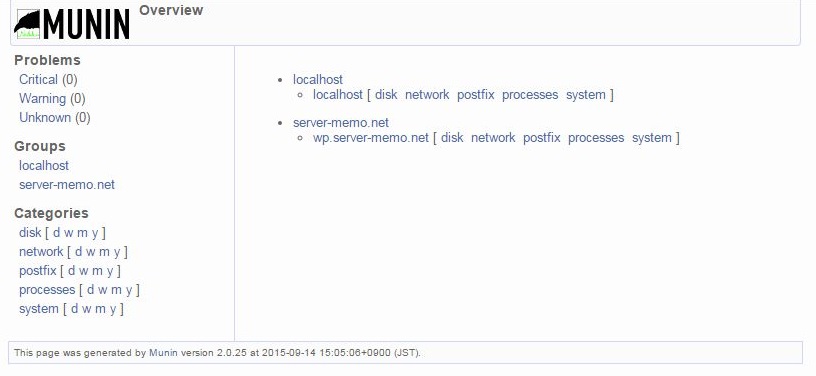
ログインすると、「監視サーバ(localhost)」と「監視対象サーバ(wp.server-memo.net)」が画面に表示されているのが確認できるはずです。
「localhost」の「disk」を試しにクリックしてみると、ディスクに関連する色々な情報が収集されグラフ化されているのが確認できます。
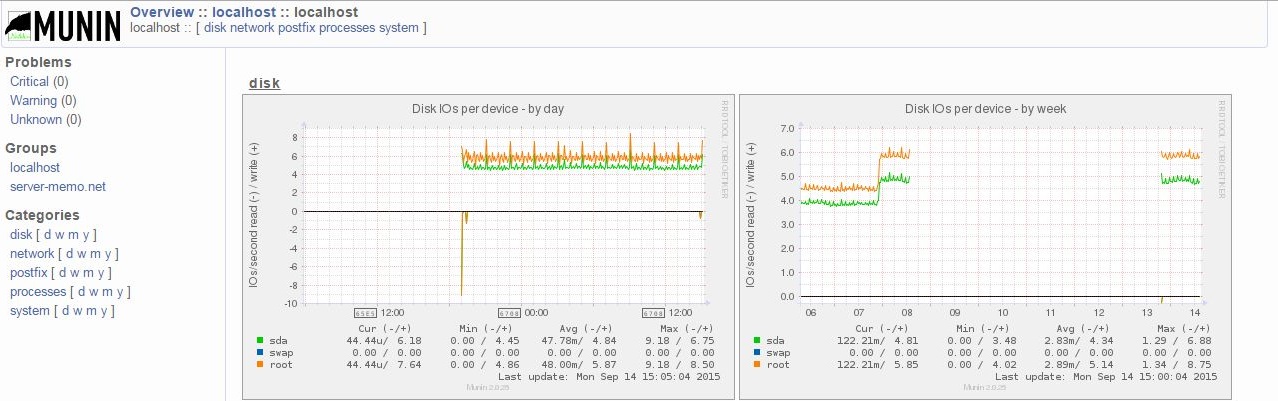
ただし、このグラフですが、「munin-server」から「munin-node」への情報収集が5分周期で行われているため、少し時間をおかないと中身が表示されないかもしれません。
ですので、グラフが表示されない場合は少し時間をおいてから再度確認してみてください。
無事グラフが表示されていれば、これで作業完了となります。
コメント
初めまして。
参考にさせていただいております。
素人質問で申し訳ないのですが、こちらの記事を参考にVMware上のCentOSにインストールして自分自身を監視して動作確認まで出来たのですが、CentOSからはwebブラウザで接続できるのですが元々のwindowsから接続することができません。
allow設定変更で設定しましたが、windowsの方にmuninserverがインストールしていないので意味ないでしょうか?
お手数ですがご教示お願い致します。
ヨシヒコさん
コメントありがとうございます。
>allow設定変更で設定しましたが、windowsの方にmuninserverがインストールしていないので意味ないでしょうか?
CentOS側で確認できているのでしたら、Windowsの方はただブラウザで接続するだけなので特に設定は必要ありません。
接続できなかった際のエラーはどのような内容でしたか?
エラーの内容が分かればもう少し問題が絞り込めるかもしれません。
とりあえずは、CentOS側のファイアウォールにて、外部からWebアクセスできるようにポートの開放がされているかご確認いただけますでしょうか。
また、webサーバのアクセスログに何か情報が無いかについてもご確認お願い出来ますでしょうか。
ysさん
ご質問ありがとうございます。
【ご質問内容】
>muninを動作するための前提となるソフトは、apache2,lighttpdを入れる必要ありますか。muninの動作させるための前提条件を教えてください。
【ご回答】
「RaspberryPi」に「munin-node」と「munin-server」をインストールするのであれば、webサーバ機能必要になります。
muninを動作させるための前提条件についてですが、muninのインストールは「apt-get munin munin-node」とかで行っているのでしょうか?
手元にRaspberryPiがないため検証ができないので推測となりますが、「apt-get」でインストールしてるのであれば「munin」に必要なソフトも合わせてインストールされると思われます。
すでに参照されているかもしれませんが、同様なことを行っている方のサイトを見つけましたのでこちらも記述させていただきます。
http://blog.bnikka.com/raspberrypi/dht11-raspberrypi.html
手元に「RaspberryPi」が無いため、推測のご回答しかできず、あまりお役に立てず申し訳ありません。
お世話になります。
raspberry piにDHT11の温湿度計をセット、Muninを使用
してグラフを表示したのですが、DHT11は正常に動作しますが、muninを動作するための前提となるソフトは、apache2,lighttpdを入れる必要ありますか。
muninの動作させるための前提条件を教えてください。